
Have you got a gripping story to tell or some fascinating insight to inspire readers? From novels to business books and user guides to training workbooks, digital publishing provides the opportunity to share your message with your audience. Having recently been through the process for myself and a couple of clients, let me share my guide on how to format e-books and workbooks.
Paper v electronic formats: which to choose
We all have a preference for paper or electronic documents, but which is best? Here are some pros and cons to help you decide:
Benefits of paper books
Some people prefer to read from a physical copy, and that is evidenced by the fact that independent bookshops are thriving despite cheaper versions being available in digital formats. Our shelves are full of paperbacks and hardback books, which we loathe to part with. Are yours? Equally, paper books enable people to add notes, which is beneficial for workbooks and interactive documents. Evidence shows that writing something down makes us much more likely to make sense of it and remember it.
Benefits of e-books
Electronic versions are convenient and affordable to download using apps and subscription services. What’s more, having multiple books and documents stored on one device is better than lugging around a bag full of books. A major advantage is that e-books save paper and ink, along with the cost of printing and shipping. What’s more, it is easy to update e-books and documents to keep the content fresh and relevant.
Best of both
Of course, there is always the option to combine the two! When I wrote my book, it was intended as a ‘living document’, to be written and doodled in. However, I know many people want to read books electronically. An ebook and accompanying workbook would be the answer to this. This option could be ideal for business guides and manuals, where the bulk is shared electronically and a seperate downloadable document can be used for interactive elements.
Crafting content for digital e-books and workbooks
Novels, non-fiction, staff manuals, industry guides; any document can be published as an e-book. The challenge is structuring this into a format that flows, engages the readers and inspires them.
Whatever the nature of your e-book or workbook, consider how to create an emotional connection with the reader. Are you challenging their thoughts, offering a fresh perspective, motivating them into action or appealing to their desires? How do you want readers to feel at the end?
Equally, think of making the content accessible. This is especially important for training workbooks, where infographics, icons, questions and activities help cement the learning and provide a point of reference. However, be aware that some e-readers will view the content on a small screen, so consider readability.
One advantage of an e-document is that any links are clickable, taking readers straight to the website referred to.
When crafting content, I found it helpful to clarify why I wanted to write a book and what I wanted others to get out of it. I referred back to these two points whenever I needed to refocus.
Editing & formatting your content
Having written and reworked your draft, you need to engage an independent person to review and recommend edits. Proofreading for errors is also vital at this stage.
Honest feedback is good. It can feel like a blow when others spot mistakes, question what you mean or suggest that you cut out a section. However, gaining other people’s opinions is so valuable. Therefore, be open to what they say, recognise the intention is good and accept that there is always room for improvement.
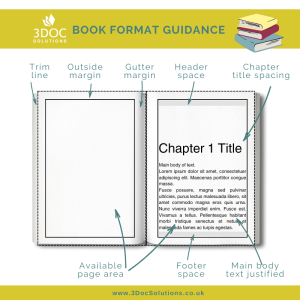
With the final version prepared, it needs formatting to the specific layout dimensions and size guidelines. This means selecting your publishing platform, as each requires specific formats. Acceptable formats include Kindle Create, Word templates, Kindle Package Format (KPF) files, ePub and MOBI.
When creating my e-book, a tough lesson I learnt is that you have to relinquish control of exact formatting. For example, you can’t specify where the page break will be. Therefore, there’s a chance that a single sentence or even one lonely ‘orphan’ word sits at the top of an empty page. Equally, readers are viewing on different devices and can alter the font size, so they will view it differently.
Read more on formatting a book
Amazon Kindle Direct Publishing (KDP) is the most widely used publishing platform. For books, the other options include Ingram Spark, Draft2Digital and iBooks. For training workbooks, take a look at Udemy, Skillshare and Teachable.
With experience in the process, specifically for Amazon KDP, I offer a book formatting service. Alternatively, you can purchase software to assist, including Atticus.
After all the hard work, publishing your e-book will feel like a major achievement.
If you want some assistance with the process of converting your manuscript to an ebook, or a physical book for self-publishing, get in touch.